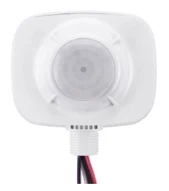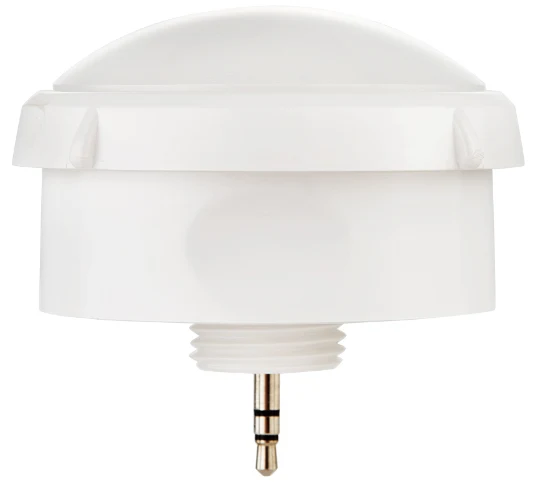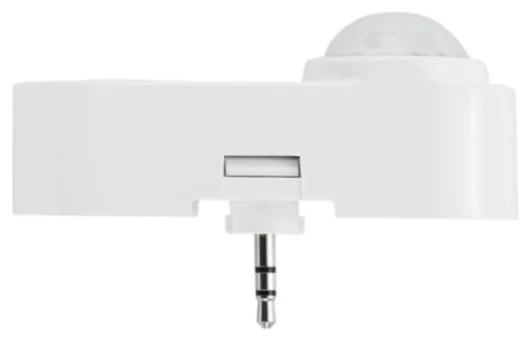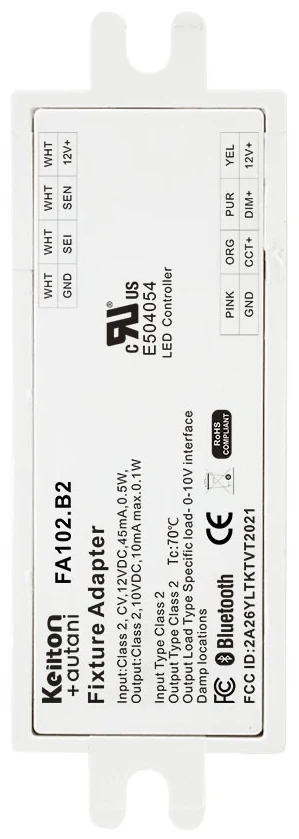
The 12 V auxiliary output (AUX) of an LED driver provides a small DC voltage that powers a sensor or wireless module directly inside the luminaire. The luminaire sensor then needs neither its own power supply nor an additional cable, and the retrofit comes down to fitting and plugging in the sensor. If the output is missing, the luminaire is not a lost cause: in halls we use the EFS104 high bay sensor with its own power supply, and in offices we check whether a driver swap is cheaper than a new luminaire.
What the auxiliary output is for
A sensor in a luminaire needs power even when the luminaire is switched off. In the past, every occupancy sensor had its own power supply or was supplied centrally via a control cable. Modern LED drivers provide this supply themselves: alongside the LED output and the dimming interface, they have a third connection, the auxiliary output. On the label it is usually marked AUX, 12 V, Vaux or +12V / GND. How to find these markings is explained in Reading the LED driver label.
For luminaire-level lighting control this is the most elegant solution. The sensor sits in a small knockout in the luminaire housing or in a plug-in socket, takes its supply from the driver and feeds the dimming signal back to the same driver. Additional cables through the ceiling or separate power supplies are not needed. The concept is explained in Luminaire-level lighting control (LLLC).
Which components use the auxiliary output
| Component | Supply according to datasheet | Use |
|---|---|---|
| IFS105SE | 12 V DC, dim-to-off driver with 12 V AUX | Luminaire sensor up to approx. 5.5 m |
| IFS108 | 12 V DC, max. 25 mA or 0.3 W | Compact sensor for panel and modular luminaires |
| EFS106 | 12 V DC, max. 50 mA or 0.6 W | High bay sensor for 6–12 m |
| EFS106W | 12 V DC, max. 50 mA or 0.6 W | IP66 high bay sensor for outdoor and damp areas |
| FA102 | 12 V DC, 45 mA or 0.5 W | Bluetooth node in the luminaire, with an Eco sensor such as the MWS105E |
All of these components dim via 0–10 V and communicate with each other via Bluetooth Mesh. The driver therefore needs not only the auxiliary output but must also be dimmable via 0–10 V and ideally support dim-to-off.
Why dim-to-off belongs with it
When a sensor switches the light off, the driver should stay connected to the mains, switch off its LEDs and keep supplying the auxiliary output. A driver with dim-to-off does exactly that: it goes into standby via the control signal. If the driver can only dim down to a minimum level, some light always remains on, or a relay is needed in the mains circuit. If that relay disconnected the driver from the mains, the auxiliary output would also disappear and the sensor in the luminaire would no longer be powered. That is why the combination of AUX and dim-to-off is the norm for luminaire sensors.
Mind the current budget
The auxiliary output is designed for small loads and is current-limited. How much it can deliver is stated in the driver datasheet. Check that the total of all connected components stays below it, for example when an FA102 is operated together with an Eco sensor. In luminaires with several drivers, the sensor is usually connected to only one driver; depending on the wiring, the dimming line can control several drivers together. We clarify this per luminaire type during planning.
AUX on DALI drivers
DALI drivers with an auxiliary supply exist too. For D4i drivers, an auxiliary supply for control devices is optional under the standard; the datasheet shows whether it is present. For luminaires with DALI drivers we use sensors with a DALI connection and match the components to your drivers. More in Retrofitting sensors to DALI luminaires.
What if the auxiliary output is missing?
Many older or simple LED drivers are dimmable but have no auxiliary output. The right route then depends on the space.
Halls and high ceilings: EFS104
For high bay luminaires there is the EFS104, a high bay sensor that does not need the auxiliary output. It has an integrated power supply for mains operation (120–277 V AC according to the datasheet, so 230 V as well), a relay rated up to 6 A and a 0–10 V dimming output. It switches the luminaire off via the relay and dims it via 0–10 V. It is designed for mounting heights of 6 to 15 m. How to plan halls with sensors is covered in High bay sensors for warehouses.
Offices and low ceilings: check case by case
In offices, corridors or meeting rooms the situation is less clear-cut. If the luminaire is in good condition and the driver is accessible, swapping the driver for a dimmable model with an auxiliary output is often cheaper than a new luminaire. Output current and voltage range must match the LED module, and the swap must be carried out properly by a qualified electrician. If the luminaire is nearing the end of its life anyway, a new luminaire with a sensor-ready driver may be the better choice. We calculate both options for your building.
Not dimmable or still fluorescent
If the driver is not dimmable at all or the luminaire still uses fluorescent tubes, the LED retrofit comes first. Sensors and luminaire replacement can be combined in a single step.
| Starting point | Solution |
|---|---|
| 0–10 V, dim-to-off, 12 V AUX | Sensor or node directly on the luminaire |
| DALI driver | Sensors with a DALI connection, matched to your drivers |
| Dimmable without AUX, hall 6–15 m | EFS104 with its own power supply and relay |
| Dimmable without AUX, office | Driver swap or new luminaire, case-by-case check |
| Not dimmable | LED retrofit, then sensors |
A missing auxiliary output is no reason to wait
A missing auxiliary supply makes the retrofit somewhat more involved but does not change the benefit. As a guideline from our projects, sensors alone save more than 60 % of lighting electricity; with daylight and background lighting up to 92 % is possible. For non-residential buildings with a heating, air-conditioning or combined ventilation system above 70 kW, Section 56 of the German GModG also requires automatic lighting control by 31 December 2029. General information, not legal advice.
How we can help
Our focus is retrofitting: we turn existing LED luminaires with dimmable 0-10 V or DALI drivers into smart lighting with sensors and app-based lighting management – without new luminaires and without new control cables. Details under Retrofit.
We check whether your drivers have an auxiliary output from the label and datasheet; if not, we propose the EFS104, a driver swap or an LED retrofit. Installation is usually carried out by us, or by your own electrical contractor if you prefer. Every project includes the AU-Manager, so occupancy detection, zoning and monitoring are included. Get in touch via our contact page.
Try it interactively
Sensor finder
Frequently asked questions
What is the AUX output on an LED driver?
A low-voltage output, usually 12 V DC, that powers sensors or wireless modules directly in the luminaire. A separate power supply or additional cable is then not needed.
Do I need a 12 V auxiliary output for a luminaire sensor?
For luminaire sensors such as the IFS105SE, IFS108, EFS106 or the FA102 Bluetooth node, yes; according to their datasheets they are powered from 12 V DC from the driver. For high bay luminaires without an auxiliary output there is the EFS104 with its own power supply.
What can I do if my LED driver has no AUX output?
In halls with mounting heights of 6 to 15 m, the EFS104 with integrated power supply, relay and 0–10 V dimming can be used. In offices, swapping the driver for a model with an auxiliary output is often cheaper than a new luminaire. Non-dimmable luminaires are first converted to dimmable LED.
How much current does an LED driver's auxiliary output supply?
It differs by driver and is stated in the datasheet. The total of connected components must stay below it. According to their datasheets, the IFS108 needs max. 25 mA, the EFS106 max. 50 mA and the FA102 45 mA.
Why does a luminaire sensor need dim-to-off?
With dim-to-off, the driver switches the LEDs off via the control signal but stays connected to the mains and keeps supplying the auxiliary output. The sensor remains active and can switch the light back on when someone enters.